emobility.academy
★ 4.8 from 6 student reviews · Curriculum reviewed by IIT Faculty · Continue learning
4.8 / 5 — 6 student reviews

Certification Course in Solar Power Plant Design and Implementation

A practical solar PV design course that takes you from irradiance analysis and plant architectures through AutoCAD drafting, single line diagrams, site surveys with Google Earth, 3D layout and shadow analysis in SketchUp, string sizing and MPPT concepts, and full PVsyst simulation with loss diagrams and yield reports.

30 video lessons
10 modules
beginner
English
Recognised & Certified by
ASDC
AICTE NEAT

Course Curriculum

30 lessons across 10 modules

A practical solar PV design course that takes you from irradiance analysis and plant architectures through AutoCAD drafting, single line diagrams, site surveys with Google Earth, 3D layout and shadow analysis in SketchUp

1
Module 1

Module 1: Introduction to Solar Power Plant

3 lessons
  1. 1

    Topic 1: Overview of Solar Photovoltaic Power Plants

    33 min· free trial

  2. 2

    Topic 2: Solar Irradiance & Radiation Analysis

    31 min· free trial

  3. 3

    Topic 3: Classification of Solar Power Plant Architectures

    21 min

2
Module 2

Module 2: AUTOCAD

2 lessons
  1. 1

    Topic 1: AutoCAD Drafting Techniques – Part 1

    49 min

  2. 2

    Topic 2: Advanced AutoCAD Drafting & Annotation – Part 2

    42 min

3
Module 3

Module 3 – Electrical Single Line Diagram (SLD) Development

2 lessons
  1. 1

    Topic 1: SLD Creation

    31 min

  2. 2

    Topic 2: SLD Detailing

    22 min

4
Module 4

Module 4: Site Survey & Resource Assessment

2 lessons
  1. 1

    Topic 1: Site Survey Methodology & Field Measurements

    8 min

  2. 2

    Topic 2: Geospatial Data Analysis Using Google Earth

    17 min

5
Module 5

Module 5 – 3D Modeling & Shadow Analysis using SketchUp

3 lessons
  1. 1

    Topic 1: SketchUp 3D Modeling – Basics of Component Layout

    33 min

  2. 2

    Topic 2: Shadow Analysis for Optimal PV Placement

    30 min

  3. 3

    Topic 3: Exporting Design Outputs into Industry-standard Formats

    8 min

6
Module 6

Module 6: Solar Plant Design Calculations

3 lessons
  1. 1

    Topic 1: Plant Capacity Calculations

    21 min

  2. 2

    Topic 2: Module String Configuration & Sizing Methodology

    23 min

  3. 3

    Topic 3: MPPT (Maximum Power Point Tracking) Algorithm Concepts

    9 min

7
Module 7

Module 7: PVsyst Software Simulation & Analysis

6 lessons
  1. 1

    Topic 1: PVsyst System Configuration

    19 min

  2. 2

    Topic 2: Module and Inverter Selection Strategies

    25 min

  3. 3

    Topic 3: Loss Diagram Analysis – Detailed Energy Losses

    22 min

  4. 4

    Topic 4: Shading Scene Design & Simulation

    19 min

  5. 5

    Topic 5: Generating Performance Reports & Yield Analysis

    16 min

  6. 6

    Topic 6: Advanced Input Parameters & Optional Configuration

    17 min

8
Module 8

Module 8 – Electrical Sizing & Protection Design

2 lessons
  1. 1

    Topic 1: Short-Circuit Current Calculation for Protection Sizing

    21 min

  2. 2

    Topic 2: DC & AC Cable Sizing

    31 min

9
Module 9

Module 9: Protection & Relay Coordination in Solar Systems

3 lessons
  1. 1

    Topic 1: Earthing System Design Principles

    25 min

  2. 2

    Topic 2: Relay Coordination - Part 1

    12 min

  3. 3

    Topic 3: Relay Coordination Part-2

    34 min

10
Module 10

Module 10 – Live End-to-End Solar Project Implementation

4 lessons
  1. 1

    Topic 1: Site Plan Development & Module Layout Engineering

    38 min

  2. 2

    Topic 2: Electrical SLD Design & String Configuration Layout

    18 min

  3. 3

    Topic 3: BOS (Balance of System) Design & Technical Report Compilation

    15 min

  4. 4

    Topic 4: Performance Ratio Calculation, Financial Modeling, Pricing Strategy & Payback Period Analysis

    10 min

Earn a certificate

Add this credential to your resume — and watch employers ask about it

Every completing learner receives a joint certificate carrying ASDC (Government of India) and AICTE NEAT recognition. The certificate carries a public verification code recruiters can validate in seconds via emobility.careers.

  • Issued when you complete the lessons and required quizzes and assignments
  • Digitally signed, with a public verification link and QR code
  • Anyone — an employer or a college — can check it in seconds
  • Shows the course title and the skills it covers
Sample emobility.academy certificate

System Requirements

Hardware & software you'll need

What to have ready before you start this course.

Hardware

  • Windows laptop or desktop with at least 8 GB RAM (16 GB recommended) for AutoCAD, SketchUp and PVsyst
  • Dedicated or recent integrated graphics for smooth 3D modelling in SketchUp
  • Mouse with a scroll wheel for drafting work

Software

  • AutoCAD (student or trial licence)
  • SketchUp (trial or free web version)
  • PVsyst (trial licence)
  • Google Earth Pro (free)

Associated Skills

What you'll be able to put on your résumé

Solar irradiance analysisPV plant architecturesAutoCAD draftingSingle line diagramsSite surveyGoogle Earth mappingSketchUp shadow analysisString sizingMPPT conceptsPVsyst simulationDC and AC cable sizingRelay coordination

DIY Projects Included

Hardware-grounded projects in your portfolio

Work you build while learning — submitted in the course and reviewed by a trainer, and yours to show afterwards.

🏠
Project 01

Rooftop layout with shadow check

Pick a rooftop in Google Earth, model it with nearby obstructions in SketchUp, run a shadow analysis and place modules where shading is lowest.

📐
Project 02

String and cable sizing sheet

For a chosen module and inverter, work out modules per string, number of strings and DC and AC cable sizes, including short-circuit current for protection sizing.

☀️
Project 03

End-to-end plant design

Follow Module 10 to produce a site plan, SLD with string layout, PVsyst yield report, BOS list, performance ratio and a simple payback calculation for a small plant.

Course Benefits

What you'll get out of it

Two audiences. Two angles. Pick the one that maps to where you are today.

For Working Professionals

  • Design deliverables
    Learn to produce the layouts, SLDs, simulation reports and BOS documents that solar projects require.
  • Industry-standard tools
    Work in AutoCAD, SketchUp and PVsyst rather than only theory.
  • Protection design
    Cover short-circuit calculations, cable sizing, earthing and relay coordination for safe plants.
  • Commercial view
    Calculate performance ratio, pricing and payback period to support proposals.

For Students & Freshers

  • Portfolio project
    The end-to-end implementation module gives you a complete design file to show employers.
  • Applies power systems subjects
    Uses SLDs, protection and cable sizing from your syllabus on a real application.
  • Multiple software skills
    Get started with four tools used across solar design teams.
  • Clear workflow
    Learn the full sequence from site survey to yield report in a logical order.

What this course includes

Everything you get when you enrol

  • - 10 Modules
  • - 30 Lectures
  • - 11.08 Hours of video content.
  • - Certification of Completion.

Who can take this course?

If any of these sound like you — you'll thrive here

  • Electrical engineering students and diploma holders who want to design rooftop and ground-mounted solar plants
  • Solar EPC site engineers who want to move into design using AutoCAD, SketchUp and PVsyst
  • Electrical contractors adding solar installations to their services
  • EV charging and energy professionals planning solar-powered charging or captive solar
  • Entrepreneurs starting a solar installation business who need to prepare layouts, SLDs and payback estimates
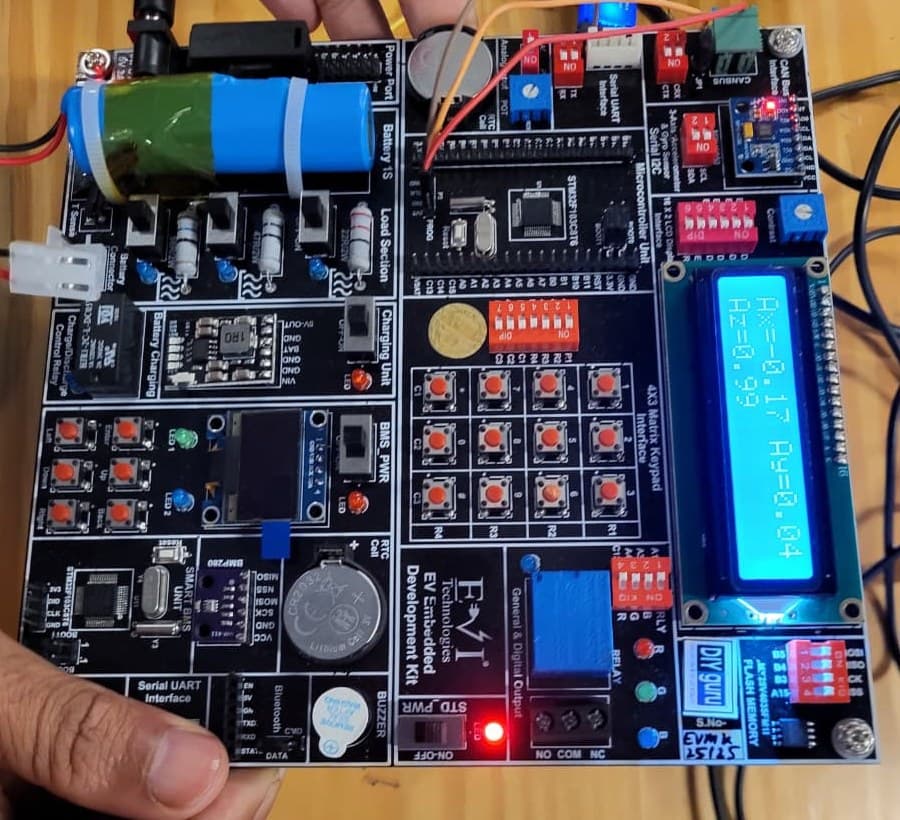
EV Embedded Development Kit board

Practise on real hardware

EV Embedded Development Kit

  • STM32 controller and Smart BMS unit
  • CAN, UART, I2C, SPI and Bluetooth
  • Sensors, LCD, OLED and motor control
  • 15+ guided experiments at home

₹10,000 + GST

See what's in the kit

Trainer Support

Stuck on a concept? Ask a trainer.

DIYguru trainer working with learners

Post questions on AutoCAD drawings, SketchUp shadow studies, PVsyst settings or protection calculations in the course Q&A on the portal and a trainer will answer there. Live doubt-clearing sessions may also be offered when scheduled.

  • Ask questions in the course Q&A, right next to the lesson
  • Trainers answer on the portal — you're notified when they reply
  • Assignments and projects you submit are reviewed by a trainer
  • Live doubt-clearing sessions when they're scheduled for the course

Bharat eMobility Recruitathon

Meet the EV industry in person

The Bharat eMobility Recruitathon brings our learners face to face with companies hiring across the EV industry. Watch the Delhi and Pune chapters.

Delhi chapterRecruitathon
Pune chapterRecruitathon

Reviews

4.8 ★ from 6 student reviews

  • ★★★★★

    Good

    Selvakumar L. · Jul 2026

  • ★★★★★

    very good experience, waiting for my completion certificate

    Avijit D. · Dec 2025

  • ★★★★★

    Nice

    Udaya C. · Dec 2025

  • ★★★★★

    excellent but no pdf provided!!

    Eddy · Nov 2025

  • ★★★★★

    Awesome learning. I have gained valuable skill & knowledge in this course. Memorable journey it was.

    Hashir S. · Jun 2025

    Reviewed on courses.diyguru.org

  • ★★★★★

    good. improve the quality of video and include subtitles.

    Vigneshwar G. · Apr 2024

    Reviewed on courses.diyguru.org

FAQ

Frequently asked questions

Do I need prior experience with AutoCAD or PVsyst?
No. The course includes modules on AutoCAD drafting, SketchUp modelling and PVsyst configuration. Basic computer skills and knowledge of electrical fundamentals will help.
Which software do I need to install?
AutoCAD (student or trial licence), SketchUp (trial or free web version), PVsyst (trial licence) and Google Earth Pro, which is free.
Does it cover protection and earthing?
Yes. Modules 8 and 9 cover short-circuit current calculation, DC and AC cable sizing, earthing system design and relay coordination.
Is there a final project?
Module 10 walks through a complete solar project, from site plan and module layout to SLD, BOS design, technical report, performance ratio and payback period analysis.
Will I get a certificate?
Yes. When you complete all lessons and the required quizzes and assignments, you receive a digitally signed certificate that anyone can check through its public verification link or QR code.
How does this relate to EVs?
The course is about solar power plant design. It is useful for EV professionals planning solar-powered charging, but the content itself focuses on PV plant design and implementation.
How is the course delivered?
As recorded video lessons on the portal that you watch at your own pace, with quizzes, assignments and a project where the course includes them. Your progress is saved lesson by lesson.
What if I get stuck?
Ask in the course's Q&A on the portal — a trainer answers there. Live doubt-clearing sessions are added when they are scheduled for the course.
What certificate will I get?
A digitally signed certificate of completion once you finish the lessons and the required quizzes and assignments. Each certificate has a public verification link and QR code anyone can check.

Talk to a counsellor

Questions about Certification Course in Solar Power Plant Design and Implementation?

Leave your details — a counsellor will call you about the syllabus, fees, EMI and certificates.

Technical Expertise You Will Gain

Where Certification Course in Solar Power Plant Design and Implementation can take you

The roles these skills are used in, what you'll be able to do, and the parts of the industry that need it.

Key Job Roles

  • →Solar PV design engineer
  • →Solar site survey engineer
  • →PVsyst simulation engineer
  • →Solar EPC project engineer
  • →AutoCAD draughtsperson for solar projects

Skill Sets

  • →Assess solar irradiance and choose a suitable plant architecture
  • →Survey a site and use Google Earth data for layout planning
  • →Run shadow analysis in SketchUp to optimise module placement
  • →Size module strings and DC and AC cables, including short-circuit current
  • →Simulate a plant in PVsyst and interpret its loss diagram and yield report
  • →Prepare an SLD, BOS list and payback analysis for a solar project

Where These Skills Are Used

  • →Solar EPC contractors
  • →Rooftop solar installers
  • →Utility-scale solar developers
  • →Solar-powered EV charging projects
  • →Electrical consultancy and design firms

Government-Certified · Industry-Endorsed · Learner-Approved

Globally recognised credentials

ASDC (Govt of India)

ASDC (Govt of India)

Automotive Skills Development Council — recognised by major OEMs worldwide.

AICTE NEAT

AICTE NEAT

National Educational Alliance for Technology — issued under AICTE's premium learning ecosystem.

Learner Stories

What our learners say

The hardware-first approach made all the difference. Came in from a generalist electronics background; the BMS and motor-drive modules gave me concrete vocabulary I could carry into Infineon interviews.

Souvik Hazra
Souvik Hazra
Senior Manager · Infineon Technologies

Industry-grade depth without the academic ivory tower. The MATLAB Simulink + capstone defence prepared me for exactly the kind of cross-functional EV problems we solve at Cummins.

Sharad Yeola
Sharad Yeola
Application Controls Lead · Cummins Inc.

Started with electronics, walked into a BMS role in Germany. The applied projects + mentor reviews are what carried me through — the certifications opened the door, the depth got me hired.

Jagatjit Barik
Jagatjit Barik
Sr. R&D Engineer (BMS xEV) · Mercedes-Benz

Ready to start Certification Course in Solar Power Plant Design and Implementation?

Recorded lessons at your own pace · trainer doubt support · verifiable certificate on completion.


Accreditations

Programs Recognised by Govt. Bodies & Industries

ASDC
AICTE NEAT
SIMOPS Saudi
DSD Malaysia
UK Government
UACH
Tata Technologies
ADYPU
UDYOGA Karnataka
Ola Mobility Institute